

Restore Spotify Connect on legacy Linux and audiophile streamers.
When a perfectly good streamer loses reliable Spotify support, replacing the hardware should not be the only answer. Spotycast moves the fragile Spotify layer to a self-hosted Linux bridge and feeds the audio back into the playback system you already use. Choose the proven HTTP / Icecast radio path, or use Spotycast Premium 3.x with direct backends for Squeezelite, MPD, Roon and OpenHome / UPnP.
A real local manager, not a black-box cloud service
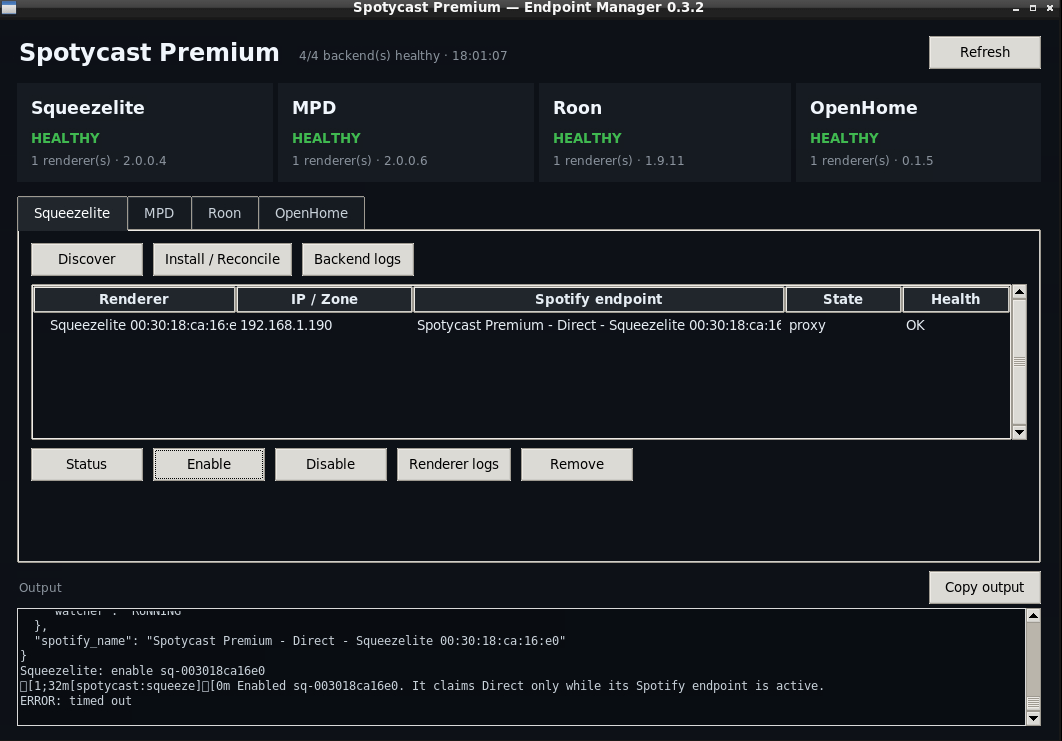
Spotycast Premium 3.x is managed locally. The current Manager exposes the renderer backends independently so you can enable only the paths your setup needs, inspect their status and logs, and keep the bridge understandable when troubleshooting.
When Spotify Connect breaks, the streamer is not necessarily obsolete
Linux-based streamers and older network players can remain excellent playback devices long after their original Spotify integration becomes unreliable, unsupported or abandoned. Devices may disappear from Spotify Connect, authentication may stop working, or an upstream Spotify change may break a previously stable integration. Spotycast separates Spotify compatibility from the playback hardware: maintain the Spotify-facing bridge once, then route audio to the player through a path it already handles well.
Two valid paths, depending on the system you want to keep
Spotycast keeps the historical radio-endpoint architecture because it is simple, portable and useful. Premium 3.x adds direct renderer backends when a tighter integration with the playback system makes more sense.
Universal HTTP radio endpoint
The established Spotycast path uses spotifyd, Liquidsoap and Icecast to publish a standard network-radio URL. It remains a pragmatic solution for any player that can consume an HTTP audio stream.
- Simple and broadly compatible
- Easy to reuse across several radio-capable players
- spotifyd path remains lossy, up to Spotify’s supported high-quality bitrate
Direct renderer backends
Premium moves beyond the “everything is a radio URL” model. The Spotycast Core can feed independent renderer-specific backends, letting each supported playback ecosystem use a path designed for it.
- Independent backends: enable only what you need
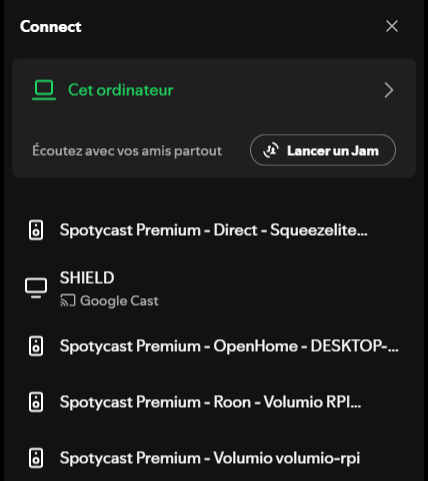
- Direct paths for Squeezelite, MPD, Roon and OpenHome / UPnP
- Lossless-capable source path where the official Spotify client and account-side availability allow it
Keep the playback ecosystem you already trust
Spotycast is most useful when the rest of the audio chain is already working well. The bridge is there to replace the fragile Spotify integration, not to redesign the whole playback system.
Roon
Premium provides a dedicated Roon backend. The historical HTTP radio approach remains useful where a radio source is preferred, but it is no longer the only Spotycast architecture.
Squeezebox / LMS / Lyrion
The Premium Squeezelite backend targets the ecosystem directly, while Classic can still expose a normal radio URL when that is the simpler fit.
MPD / Volumio / moOde
Premium includes an MPD-oriented path for systems built around MPD. Classic remains available for players that simply need an HTTP network-radio endpoint.
OpenHome / UPnP
The OpenHome backend extends the direct approach to a broad class of network renderers that still have excellent audio hardware but limited modern Spotify support.
Why bridge Spotify instead of replacing the streamer?
A mature audio setup often contains much more than Spotify: local libraries, DSP, zones, DAC integration, LMS plugins, Roon processing, MPD automation or OpenHome control. If only the Spotify endpoint has become unreliable, replacing the whole chain can be disproportionate. Spotycast isolates that moving dependency on a Linux host that can be maintained independently from the player firmware.
Preserve working hardware
Keep a streamer, server or renderer that still performs its core audio job well instead of discarding it because one cloud integration aged out.
Centralize the fragile layer
Maintain the Spotify-facing component on one Debian/Linux bridge rather than depending on several vendor-specific Spotify implementations.
Choose the least invasive output
Use an ordinary HTTP radio URL when universality matters, or a Premium renderer backend when the direct path better matches your stack.
Audio quality: keep the claims technical
Spotycast does not manufacture quality that is absent upstream. The Classic spotifyd route is a stable lossy Spotify Connect path. Premium can use a different source and direct renderer architecture for systems where the official Spotify client exposes a lossless-capable path, but actual lossless availability still depends on Spotify-side account, client and service behavior.
What Spotycast is — and what it is not
A compatibility bridge
Spotycast restores a usable Spotify-controlled audio path to existing playback systems. It does not replace the Spotify app or provide a separate music catalog.
Not universal device emulation
Premium supports specific renderer families. A device still needs a compatible Squeezelite/LMS, MPD, Roon or OpenHome/UPnP path, or it can use the Classic HTTP stream.
Private LAN use
Spotycast is designed for personal playback and routing on a local network, not for public redistribution or internet radio broadcasting.
Spotify is a trademark of Spotify AB. Spotycast is an independent project and is not affiliated with or endorsed by Spotify, Roon Labs, Logitech, Lyrion, Volumio, moOde, Innuos or Antipodes.
Frequently asked questions
Can Spotycast help if Spotify Connect stopped working on my Linux streamer?
That is the primary use case. Spotycast moves the Spotify-facing component to a maintained Linux bridge and then feeds the audio back to the existing playback system through either the Classic HTTP/Icecast path or a supported Premium renderer backend. See Spotify Connect not working.
What is the output of Spotycast?
It depends on the edition and selected path. Classic publishes a standard HTTP/Icecast radio stream. Premium 3.x can instead use independent Squeezelite, MPD, Roon or OpenHome backends.
Can I use Spotify with Roon through Spotycast?
Yes. Premium 3.x includes a dedicated Roon backend, while the historical radio-source workflow remains available where that architecture is useful. See the dedicated Spotify with Roon page.
Do I have to replace my existing player?
No. The purpose of Spotycast is precisely to keep useful playback hardware and software in service when its native Spotify integration is the weak point. The receiving system still needs one compatible Spotycast output path.